Virtual Machine Management
Built directly on KVM and libvirt - we're not wrapping someone else's API and calling it a product.
The Full VPS Lifecycle
Create, start, stop, reboot, rebuild, destroy. Cloud-init handles hostname, SSH keys, and the root password on first boot, so a fresh guest is actually ready when it says it's ready.
Clone & Template
Duplicate a stopped VPS into a new guest, or turn any VPS you've already configured into a reusable OS template of your own.
Resource Plans
Define a plan once - vCPU, RAM, disk, max VM count - and it's enforced on every VPS created under it, not just shown as a suggestion. Add CPU %, swap, bandwidth caps, an IP pool restriction, and DNS defaults if you need them, then assign the whole thing to a user or reseller.
Bandwidth & Speed Limits
A monthly transfer cap and an upload/network speed ceiling, per VPS. Leave either unrestricted if that's what the plan calls for.
40+ OS Templates
Ubuntu, Debian, AlmaLinux, Rocky, CentOS Stream, Fedora, and Windows Server on the KVM side, with a matching set of LXC container templates alongside them. Each one downloads once and caches, so the tenth VPS you build from it comes up in seconds, not minutes.
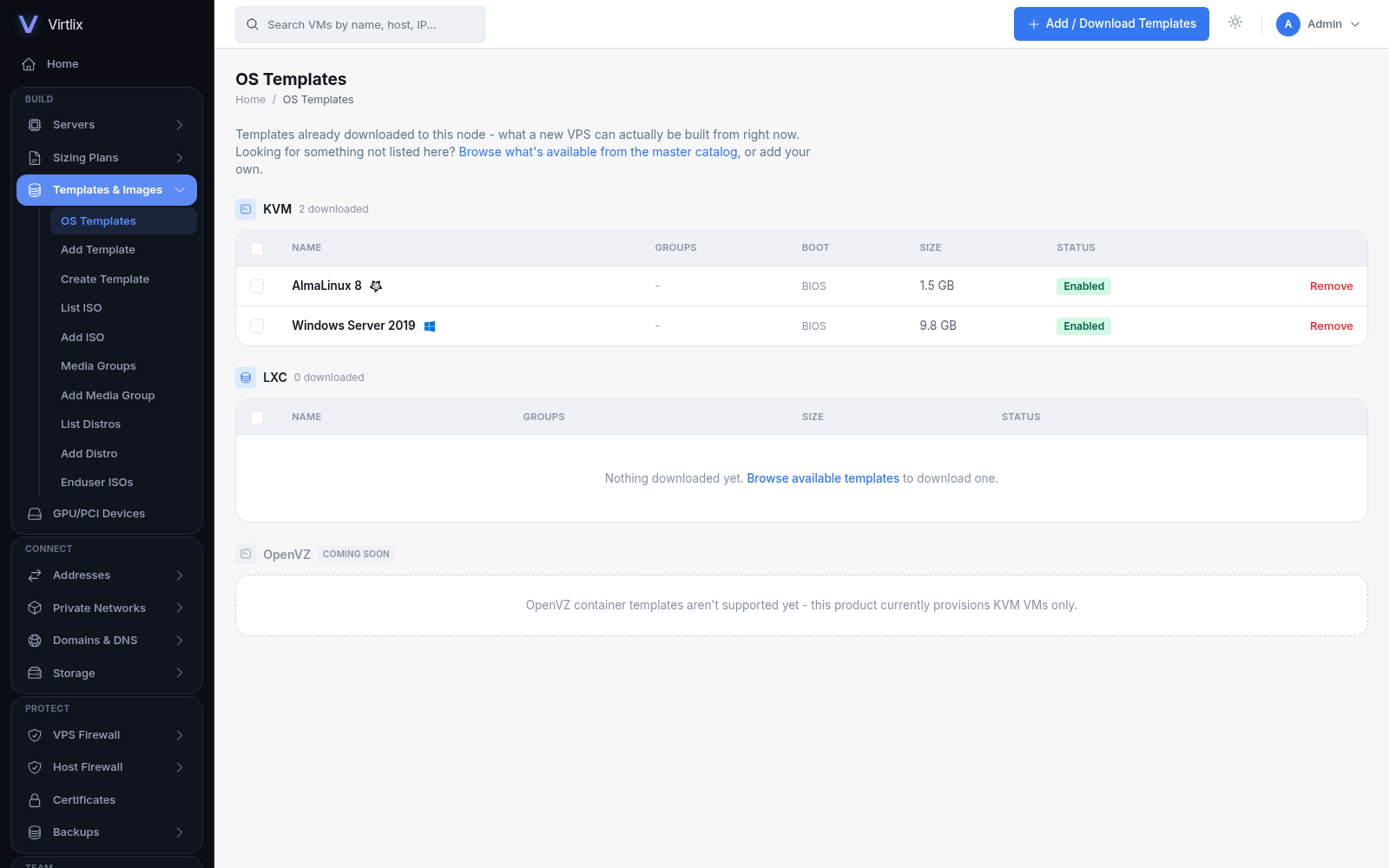
Bring Your Own ISOs
Upload installer ISOs directly, and if you want, let your own end-users upload theirs too - capped by whatever storage quota you set for them.
Blank + ISO Install
Sometimes you just want to install it yourself. Boot an attached ISO through the console and click through setup exactly like you would on real hardware - it's also how we'd suggest building your own custom OS templates.
Rescue Mode
Broken bootloader, forgotten password - reboot the VPS into a real cloud-init rescue environment, set your own password for the session, and its actual disk is never touched.
CPU %, DNS Override & SSH Key Picker
Cap total CPU usage independently of vCPU count, point a VPS at your own DNS servers, and pick an SSH key - one you've saved, one you paste fresh, or one Virtlix generates for you on the spot (shown once, so save it).
Lock Down Password Auth, or Skip VNC Entirely
One checkbox turns off SSH password auth for good (key-only from then on). Another drops the VNC console altogether for a VPS that just doesn't need one. Neither needs a rebuild to change your mind later.
Comes Back on Its Own
If this server reboots - a patch, a power cut, whatever - whatever was actually running comes back up by itself, and whatever was off stays off. No script, no cron job, no manually restarting twenty VPS by hand at 3am.
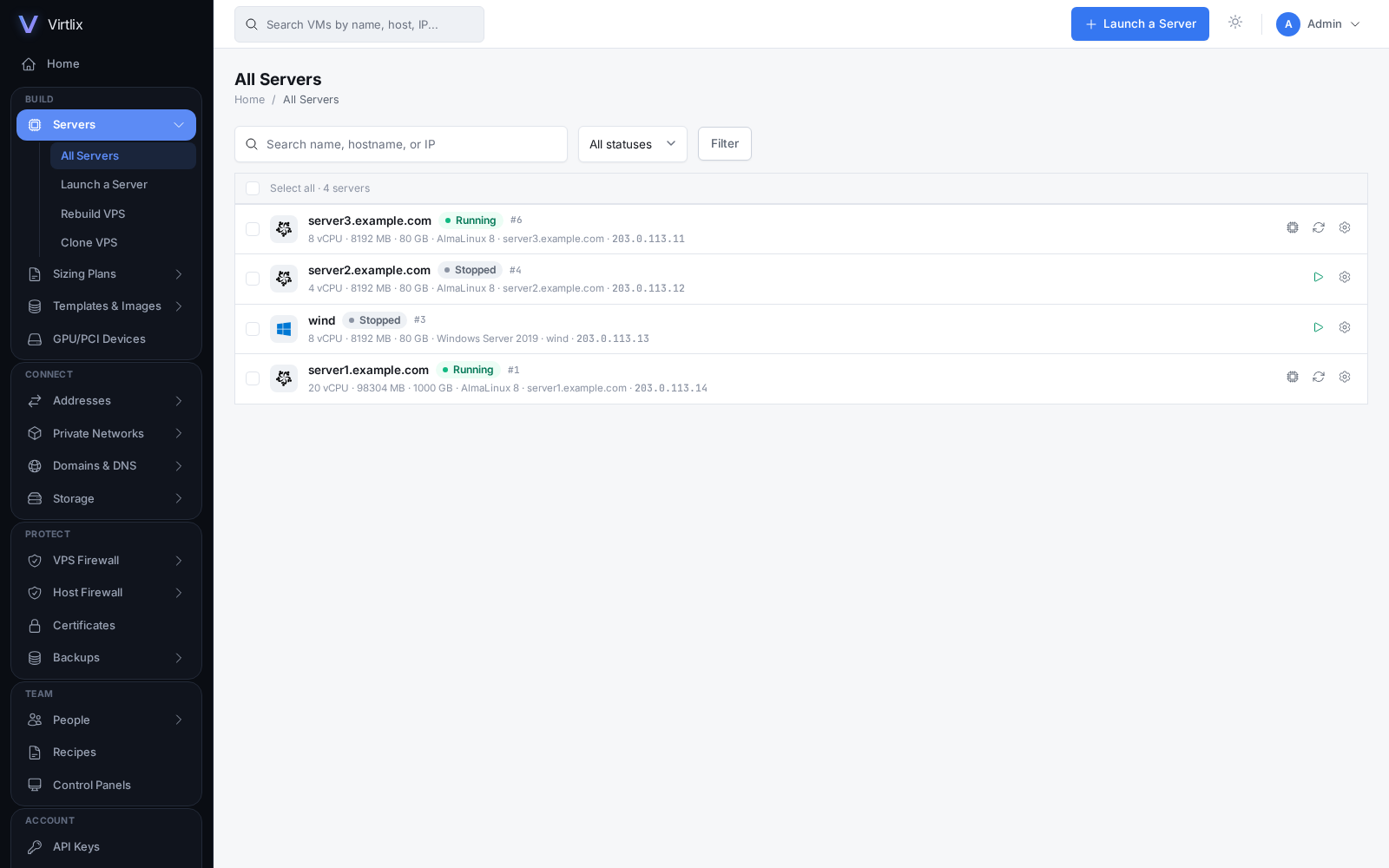
All Servers - every VPS, its OS, specs and status.
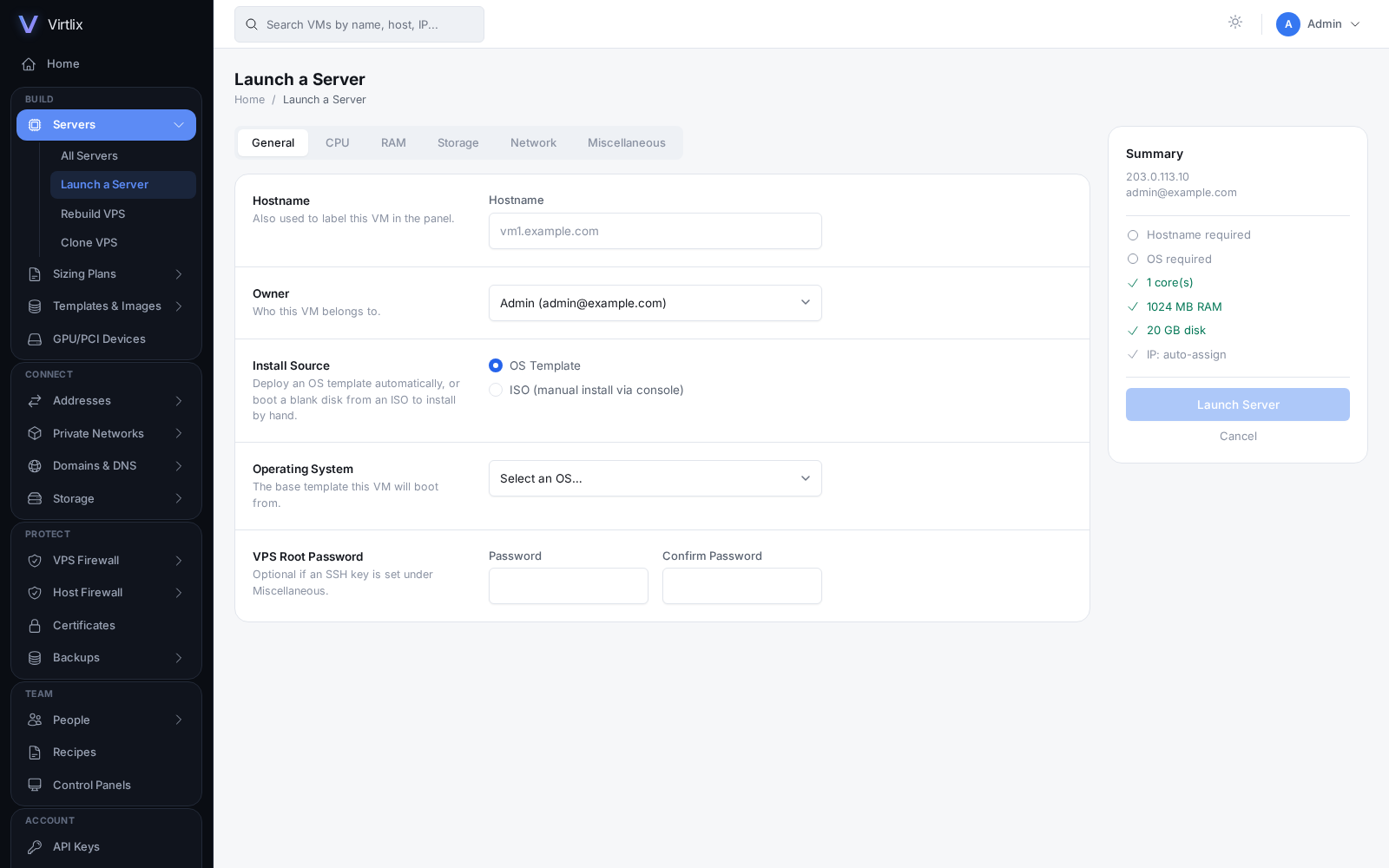
Launch a Server - pick an OS, size it, done.
LXC Containers
A second, lighter-weight backend next to KVM. Real container tooling underneath, no wrapper pretending otherwise.
The Real lxc-* Tools
Standard command-line container tooling, veth+bridge networking, and the exact same bridged/routed networks your KVM guests already sit on - nothing container-specific to relearn.
The Full Lifecycle
Create, start, stop, reboot, reinstall, delete. Hostname, root password, SSH key, and static networking are all injected automatically on first boot.
Ubuntu, Debian, Rocky, CentOS Stream & AlmaLinux
One template per major distro family, and each one comes straight from that project's own official image - not a mirror we happened to trust.
Resource Limits & Live Stats
The same cgroup CPU/memory limits and live usage graphs you'd get on a KVM VPS.
What LXC Can't Do Yet
Console access, backups, cloning, extra volumes, PCI/GPU passthrough, and building a template from an existing guest are still KVM-only. We'd rather grey those out in the panel than have them silently fail on a container.
Windows Guest Support
Bring a Windows Server template and it actually works - no RDP-in-and-fix-it-yourself required.
Zero-Touch First Boot
The Windows setup wizard (OOBE) never shows up. Administrator password, static IPv4/IPv6, DNS, timezone, and RDP are all set before your customer ever connects.
Live Password & Hostname Changes
Applied instantly through the QEMU Guest Agent when it's running. Otherwise, on the next restart - either way, no manual RDP session required.
Build Your Own Templates
Boot a Windows Server ISO through Blank + ISO Install, load the virtio drivers that come with it, sysprep it, and turn the result into a reusable template with one click.
Server 2016 through 2025
Sysprepped, virtio-ready templates for every version from 2016 to 2025, ready to switch on from the OS template catalog whenever you need them.
virtio-SCSI, If You Want It
Building a custom Windows template through Blank + ISO Install? Pick virtio-SCSI over virtio-blk for the newer, better-queued controller modern Windows deployments expect.
Console, Networking & Firewall
Browser access and real network control - you shouldn't need a separate SSH client just to look at a server.
noVNC Console
A full graphical console, right in the browser, for every VPS - it works even before the guest has networking up.
Web Server Terminal
A real shell on the host itself, in-browser, over HTTP or HTTPS.
It Figures Out Your Network
Add an IP and Virtlix inspects the host to work out how it needs to reach your VMs - already bridged, a shared network (MacVTap), or a provider that routes extra IPs to your one fixed MAC (Vultr, Hetzner, OVH). That last case gets real proxy-ARP support instead of a VM that's technically running but unreachable.
Bridged, MacVTap, Routed, NAT & Open vSwitch
Whatever mode your deployment actually needs - picked automatically most of the time, or set by hand, including a per-IP MAC override for providers that assign a specific virtual MAC.
IPv6, Actually Dual-Stack
Networks and IP pool entries carry a paired IPv6 address, so a new VPS gets real dual-stack networking from the moment it boots, not a bolted-on afterthought.
Network Filtering
MAC/IP spoofing and rogue IPv6 router advertisements, blocked at the guest level - use the built-in Libvirt filter, our lighter Native Performance profile, or write your own as JSON.
VPS Firewall
Rules enforced at the host, per guest - it doesn't matter what state the guest's own firewall is in.
Server Firewall Plans
Reusable, host-level rule sets, with a safety net: a change that would lock you out gets reverted automatically.
IP Pool Management
Keep track of your address block, auto-assign or hand-pick an IP for each new VPS, and add several non-sequential addresses at once - each with its own optional MAC override for providers like OVH.
PowerDNS Integration
Connect a real PowerDNS Authoritative Server and create reverse DNS zones for your IP ranges without leaving the panel.
Native Firewall
A dedicated iptables chain for blocking or allowing one IP or port right now, independent of firewalld, ufw, or any firewall plan you've already got running.
Lock an IP
Reserve an address with an optional note so nothing claims it by accident - locked IPs are skipped by both Create VPS and auto-assign.
Free SSL, One Click
Point your domain at the server and issue a real Let's Encrypt or ZeroSSL certificate for the panel itself from Configuration → SSL. No separate certbot setup.
phpMyAdmin, Already There
A real database admin tool for the MariaDB server this node runs on, behind the same short-lived-token gate as the Server Terminal. Nothing to install.
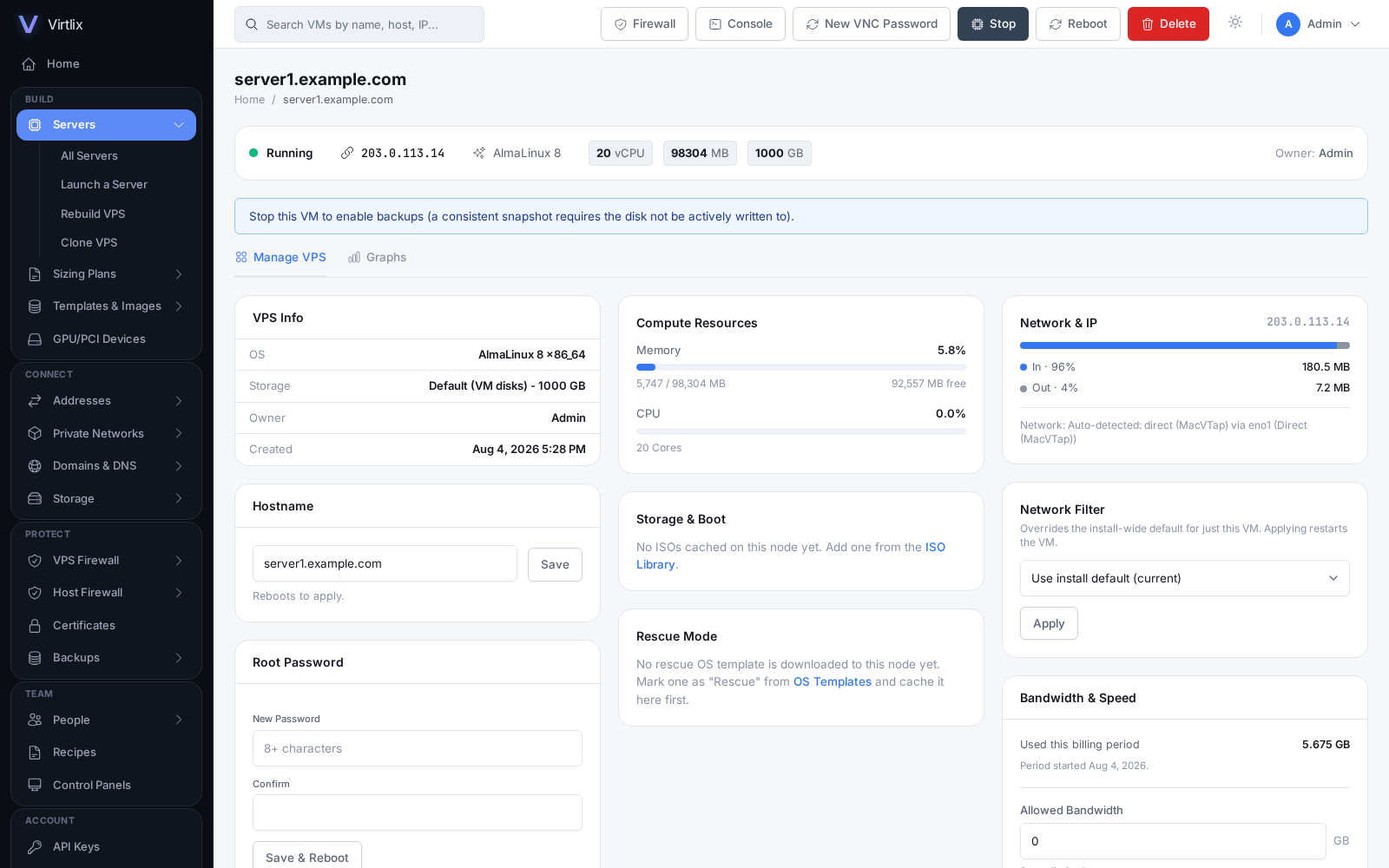
Per-VPS management - live resource usage, network filter, bandwidth caps.
Storage & Hardware
Beyond a local disk - remote storage and real device passthrough when you actually need it.
Storage Pools
Local disk by default. Add a Remote Filesystem (NFS) pool and it mounts itself and stays mounted across reboots - no fstab babysitting. Ceph RBD, StorPool, and Lightbits NVMe/TCP are on our radar, not shipped yet.
PCI & USB Passthrough
Attach a GPU, a USB controller, whatever the host has, directly to a VM. A live IOMMU group scan helps you find the right address instead of guessing at it.
Volumes
Extra block storage per VM, separate from its main disk, attach and detach as needed.
Media Groups
Group your OS templates and ISOs into named collections instead of scrolling one long flat list every time.
Hypervisor Insights
Click the host on your dashboard and see real CPU model, physical cores, threads, plus live memory, disk, and bandwidth usage - you shouldn't need an SSH session just to check on the box.
Backups, Multi-Server & Licensing
Growing past one dedicated server shouldn't mean losing central control of it.
Automated Backups
Scheduled per-VPS, with a remote destination if you want one - SSH/FTP, Amazon S3 (or anything S3-compatible), Google Drive, OneDrive, or Dropbox. A copy that survives losing the host, not just a snapshot next to it.
Multi-Server Control
Register other Virtlix installs and watch every server's resources and usage from one dashboard - create, edit, and manage their VMs remotely, without logging into each box separately.
License Limits That Actually Hold
Your plan's VPS cap is enforced by the panel, not just shown as a number on a settings page. Upgrade and it applies immediately - no reinstall, no downtime.
Automatic License Recovery
Re-issue a key and the panel picks it up on its next check-in by itself. No SSH session to hand-edit a config file.
Self-Updating
Configuration → Updates checks for a new version on its own and shows you the full changelog before you click to apply it - so you know what's changing before it changes.
Signed Webhook Callbacks
An HMAC-signed POST the moment a VM is created, deleted, started, or stopped - wire it straight into your own billing or ticket system.
IP Allowlisting & Login Security
Restrict the panel and API to known IPs, and set your own login-attempt limits and lockout duration.
Two-Factor Authentication
TOTP for admin and reseller accounts, plus recovery codes for the day someone loses their phone.
Resell Through WHMCS
Sell VPS hosting through your own WHMCS. An order provisions the VM by itself, and your clients get live usage charts, hostname/password changes, and a self-service reinstall right from their client area. A separate module handles renewing your own Virtlix license the same way.
Bandwidth Metering & Usage-Based Billing
Real per-VPS usage, sampled every 15 minutes against each customer's own billing period, with an optional hard auto-suspend at whatever limit you set. It reports straight into WHMCS's own Usage Based Billing, so overage gets invoiced automatically instead of you chasing it by hand.
Everything's Logged
Every API call, every VM or user action, every IP claimed or released - each one tied to the real requester IP, searchable from Configuration → Logs when you need to answer "who did that."
Want the full breakdown? Read the documentation, or see pricing for per-node licensing.